


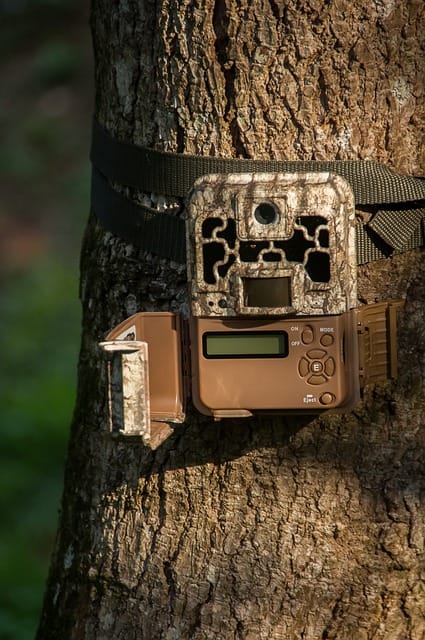
Many outdoor enthusiasts, hunters, and wildlife researchers rely on trail cameras to monitor animal activity, track movements, and capture rare wildlife behaviors. The Wosoda trail camera is a popular choice because of its affordability, compact design, and reliable night vision. However, one common issue users encounter is the Wosoda trail camera not recording at night. This problem can be frustrating, especially when night-time footage is essential for tracking nocturnal animals.
Night recording failures can occur due to a variety of reasons—from simple battery problems to complex sensor or firmware issues. Understanding why your camera isn’t capturing night activity is crucial for troubleshooting and ensuring your camera works optimally.
In this comprehensive guide, we’ll explore:
- The common causes of a Wosoda trail camera not recording at night
- Step-by-step troubleshooting tips to fix the issue
- Best practices to optimize night recordings
- Frequently asked questions (FAQs) about night recording issues
- When and how to contact Wosoda customer support
By the end of this article, you’ll have all the knowledge needed to ensure your Wosoda trail camera captures every night-time moment, helping you make the most out of your wildlife or security monitoring efforts.
Key Takeaways:
- Night recording is affected by battery life, sensor placement, camera settings, and environmental factors.
- Simple maintenance like updating firmware, adjusting settings, or testing SD cards can solve most issues.
- Correct positioning and proper infrared setup significantly improve night detection.
Common Reasons Wosoda Trail Camera Fails to Record at Night
If your Wosoda trail camera is not recording at night, it’s important to understand the common reasons behind this issue. Night-time failures can often be traced to power, settings, sensor issues, or environmental factors. Here’s an in-depth look at the main causes:
Low Battery or Power Issues
One of the most frequent reasons your camera may fail to record at night is insufficient power. Night recordings require more energy than daytime recordings because the infrared (IR) LEDs consume extra battery when illuminating the scene in darkness.
Key points to consider:
- Battery type matters: Alkaline batteries may drain quickly in cold temperatures. Lithium batteries are recommended for longer life and consistent power, especially in sub-zero conditions.
- Battery monitoring: Many Wosoda trail cameras display battery levels; check this regularly. A low battery may allow the camera to function during the day but fail to trigger night recordings.
- External power options: For long-term setups, consider using an external solar panel or rechargeable battery pack to maintain consistent performance.
Tip: Always replace all batteries at the same time to avoid uneven power distribution, which can cause night recordings to fail.
Infrared Sensor Problems
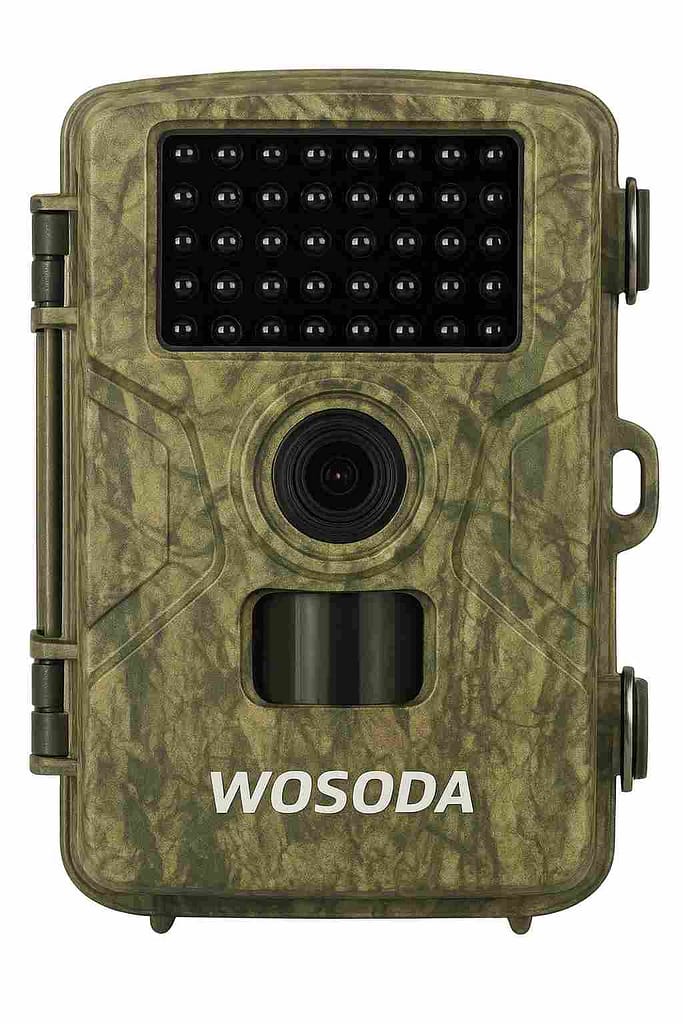
The motion detection sensor, or Passive Infrared Sensor (PIR), is responsible for detecting movement and triggering recordings. If this sensor malfunctions or is obstructed, the camera may not record at night.
Causes of sensor issues include:
- Obstructions: Branches, leaves, or other objects may block the sensor’s field of view.
- Dirty sensor lens: Dirt or condensation on the PIR sensor can reduce its sensitivity.
- Temperature sensitivity: PIR sensors rely on temperature differences between objects and the environment. On extremely cold nights, small animals may not trigger detection.
Tip: Regularly clean the sensor with a soft cloth and ensure no objects are directly in front of the lens or sensor.
Incorrect Camera Settings
Even if your hardware is fine, wrong camera settings can prevent night recordings.
Settings to check:
- Night mode: Ensure the camera is set to IR night vision or night recording mode rather than daytime color mode.
- Trigger interval: If the camera is set to a long delay between triggers, it may miss activity. Reduce the interval to improve night coverage.
- Video/photo mode: Some users accidentally leave the camera in photo mode. Video mode requires more power and may behave differently at night.
Pro Tip: Many Wosoda cameras allow you to test the trigger and IR in a dark room. This helps confirm settings are correctly configured.
Poor Lighting Conditions
Wosoda trail cameras rely on infrared LEDs to illuminate the area at night. However, IR has limitations:
- Short-range IR: Most Wosoda cameras have IR ranges between 20–65 feet. Objects beyond this range may not be visible at night.
- Obstructions: Fog, snow, or heavy foliage can reduce IR effectiveness.
- Reflective surfaces: Wet leaves or reflective objects may scatter IR, causing incomplete night recordings.
Tip: Place the camera at a slightly elevated angle and clear any obstructions to maximize IR coverage.
Memory Card or Storage Issues
A full or slow SD card can prevent recordings from saving, even if the camera is functioning properly.
What to check:
- Capacity: Use cards with at least 32GB for extended night-time recording.
- Speed: Class 10 or UHS-I cards are recommended to handle high-resolution video.
- Corruption: Format the SD card in-camera before use to prevent read/write errors.
Software or Firmware Glitches
Sometimes, the problem isn’t hardware but software. Outdated or buggy firmware can lead to night recording failures.
Solutions include:
- Firmware updates: Check Wosoda’s official website for firmware upgrades for your camera model.
- Factory reset: Resetting the camera can restore default night settings if misconfigured.
Summary Table: Common Causes of Wosoda Trail Camera Night Failures
| Cause | Symptoms | Suggested Fix |
| Low battery/power | Camera works in day but not at night | Replace batteries, use lithium or external power |
| Infrared sensor issues | No night detection, missed animals | Clean sensor, remove obstructions, adjust height |
| Incorrect camera settings | Camera triggers incorrectly or misses | Check night mode, trigger interval, and video/photo mode |
| Poor lighting/IR limitations | Dark footage, limited range | Adjust placement, remove obstructions, check IR range |
| SD card problems | Recordings not saved, error messages | Format card in-camera, use Class 10/UHS-I card |
| Firmware/software glitches | Unresponsive camera or missed triggers | Update firmware, reset camera |
How to Troubleshoot Your Wosoda Trail Camera Not Recording at Night
When your Wosoda trail camera is not recording at night, knowing how to systematically troubleshoot the issue can save time and frustration. Here’s a detailed guide to step-by-step fixes, covering power, settings, placement, and software issues.
Check and Replace Batteries
Night recordings consume more power because infrared LEDs use extra energy. Weak batteries are one of the most common reasons for missed night footage.
Steps to troubleshoot battery issues:
- Remove all batteries and test them individually with a battery tester.
- Replace low or uneven batteries with high-quality lithium batteries.
- Ensure all batteries are inserted correctly, observing proper polarity (+/-).
- For long-term setups, consider a rechargeable external battery pack or solar panel.
Pro Tip: Always replace all batteries at once to maintain consistent voltage. Mixing old and new batteries can lead to inconsistent night performance.
Adjust Motion Sensor Settings
The Passive Infrared (PIR) motion sensor is responsible for triggering night recordings. If it’s misconfigured, your camera may not detect movement at night.
How to fix:
- Sensitivity: Set the motion sensitivity to medium or high to ensure small or distant animals trigger recording.
- Trigger interval: Reduce the trigger delay to capture multiple movements. A long delay might cause the camera to miss activity.
- Test detection: Walk in front of the camera at night to confirm that the motion sensor detects you.
Tip: Avoid pointing the camera at moving branches, leaves, or areas with reflective surfaces, as these can cause false triggers or missed recordings.
Verify Night Mode and Infrared Settings
Incorrect camera settings are a common culprit for night recording issues.
Checklist:
- Ensure the camera is in night recording mode (infrared/IR mode).
- Confirm whether the camera is set to video or photo mode. Night video consumes more power but may be necessary for movement documentation.
- Some Wosoda cameras have black-and-white IR mode for night, which is different from color video mode. Use the recommended setting for your model.
Tip: Test the IR LEDs by covering the camera lens slightly and observing if it triggers a night recording in low-light conditions.
Inspect the Camera Placement
Even with perfect batteries and settings, poor placement can prevent night recordings.
Best practices for placement:
- Mount the camera 3–4 feet above the ground for optimal PIR detection.
- Avoid pointing at branches, reflective surfaces, or open sky, which can interfere with motion detection.
- Angle the camera slightly downward to capture animal movements effectively.
Pro Tip: Conduct a night test by walking in front of the camera and checking whether the motion sensor triggers recording.
Format and Test the SD Card
A corrupted or full SD card can stop your camera from saving night recordings.
Steps:
- Insert the SD card into your computer or camera.
- Back up any existing footage.
- Format the card in-camera, not on a computer, to ensure compatibility.
- Use Class 10 or UHS-I cards, preferably 32GB–64GB for high-resolution video.
Tip: Avoid using cheap, low-speed SD cards, as these can fail during high-speed recording at night.
Update Firmware and Reset Camera
Sometimes night recording failures are due to software or firmware glitches.
Fixes include:
- Visit the Wosoda official website and check for firmware updates for your camera model.
- Follow the instructions to update firmware, which may improve motion detection and night recording performance.
- If updates don’t help, perform a factory reset to restore default settings, then reconfigure night recording options.
Pro Tip: Keep a small notebook or photo log of your camera settings before resetting, so you can restore preferred configurations.
Quick Troubleshooting Checklist
| Step | Action | Notes |
| 1 | Check/replace batteries | Use high-quality lithium or rechargeable packs |
| 2 | Test motion sensor | Walk in front of camera at night to confirm triggers |
| 3 | Verify night/IR settings | Ensure proper night mode and video/photo selection |
| 4 | Adjust placement | Avoid obstructions and reflective surfaces |
| 5 | Format SD card | Use Class 10 or higher, 32–64GB recommended |
| 6 | Update firmware/reset camera | Visit official Wosoda website |
Tips to Improve Night Recording on Wosoda Trail Cameras
Even after troubleshooting, there are proactive steps you can take to improve night-time recording performance on your Wosoda trail camera. These tips ensure consistent, high-quality footage of nocturnal wildlife and minimize missed activity.
Use High-Quality Batteries
Night recordings consume more power due to infrared (IR) LEDs. Battery choice directly affects camera performance.
Recommendations:
- Lithium batteries: Offer longer life, better cold-weather performance, and consistent voltage.
- Avoid mixing old and new batteries, as uneven voltage can cause the camera to fail at night.
- External power packs or solar panels: Ideal for long-term outdoor setups to ensure uninterrupted night recording.
Fact: Studies have shown that lithium batteries can last up to 50% longer in low temperatures compared to alkaline batteries.
Optimize Camera Placement and Angle
Proper placement is crucial for detecting movement in low-light conditions.
Best practices:
- Mount the camera 3–4 feet off the ground, slightly angled downward.
- Avoid pointing directly at bright lights or reflective surfaces, which can confuse the motion sensor.
- Clear any obstructions like branches, tall grass, or debris in the detection zone.
- Avoid windy areas: Moving leaves or grass can trigger false alarms or mask true movement.
Tip: Conduct a test walk at night in front of the camera to ensure optimal coverage.
Reduce False Triggers
False triggers at night can drain batteries and fill your SD card with useless footage.
Common causes of false triggers:
- Moving branches, leaves, or shadows
- Reflective surfaces like water, metal, or wet foliage
- Temperature variations near the camera (e.g., heating vents or sun-heated objects)
Fixes:
- Trim foliage near the camera
- Adjust motion sensitivity (medium to high)
- Change camera angle to avoid reflective surfaces
Pro Tip: Use test recordings at night to fine-tune sensitivity without missing animals.
Test Your Camera in Night Conditions
Testing your camera before relying on it is essential for night monitoring.
Steps for testing:
- Place the camera in the exact location where you plan to leave it.
- Walk or move in front of the camera at night to confirm motion detection and IR illumination.
- Check recorded footage to ensure the image is clear and animals are captured.
Fact: Many users discover misaligned motion sensors or IR issues during testing, saving them from missed night activity later.
Consider Upgrading to Enhanced Infrared Models
Some Wosoda models have limited IR range or weaker night vision. If you frequently monitor nocturnal wildlife, upgrading may be beneficial.
Options:
- No-glow IR cameras: Invisible infrared light reduces disturbance to wildlife.
- Black-and-white IR mode: Offers sharper night images compared to low-quality color night recording.
- Extended IR range cameras: Capture movement at 50–65 feet at night instead of standard 20–30 feet.
Case Study: A user switched from a standard Wosoda model with 20-foot IR range to a no-glow 65-foot IR model and reported 90% more successful night captures in dense forest areas.
Summary Table: Night Recording Improvement Tips
| Tip | Why It Helps | How to Implement |
| Use high-quality batteries | Longer battery life, consistent power | Lithium batteries or external packs |
| Optimize placement & angle | Maximizes PIR detection | Mount 3–4 ft high, slight downward angle |
| Reduce false triggers | Avoid wasted footage & battery drain | Trim foliage, adjust sensitivity |
| Test camera at night | Ensure settings and IR work | Walk in front of camera in dark conditions |
| Upgrade infrared model | Capture distant or nocturnal animals | Consider no-glow or extended IR cameras |
These strategies not only fix common night recording problems but also help you maximize the effectiveness of your Wosoda trail camera for consistent nocturnal monitoring.
Frequently Asked Questions About Wosoda Trail Camera Night Recording
Many Wosoda users encounter issues with night recording and have similar questions. Below are the most frequently asked questions, along with detailed answers and practical advice.
Why does my Wosoda trail camera record during the day but not at night?
This is one of the most common complaints. Daytime recording requires less power, and ambient light helps trigger the motion sensor. At night:
- The camera relies on infrared LEDs, which consume more battery.
- PIR sensors may be less sensitive to small animals in low temperatures.
- Incorrect night mode or trigger settings can prevent recordings.
Solution: Check batteries, verify night mode, and adjust motion sensor sensitivity.
How can I make my Wosoda camera detect animals in complete darkness?
To improve night detection:
- Ensure night/IR mode is enabled.
- Use high-quality batteries to power the infrared LEDs.
- Position the camera 3–4 feet above ground, angled slightly downward.
- Avoid obstructions or reflective surfaces.
- Test detection by walking in front of the camera at night.
Tip: Some Wosoda models offer no-glow IR, which is better for sensitive nocturnal wildlife.
Can extreme cold weather affect night recordings?
Yes. Cold temperatures can reduce battery efficiency and slow IR LED performance, causing missed recordings.
Recommendations:
- Use lithium batteries, which perform well in low temperatures.
- Keep a spare battery pack in a warm place before inserting it into the camera.
- Test the camera on particularly cold nights to ensure proper function.
How long do infrared LEDs last on Wosoda cameras?
Infrared LEDs typically last thousands of hours, but factors like frequent triggering, extreme temperatures, and long-term use can reduce lifespan.
Signs of LED degradation:
- Night recordings are dim or grainy
- Animals are partially or not visible at all
- IR glow is weak or inconsistent
Tip: If IR performance declines, consider upgrading to a newer model with extended IR range.
What SD card size and type work best for night video?
- Recommended SD card size: 32–64GB
- Minimum speed class: Class 10 or UHS-I
- Formatting: Always format the SD card in the camera before use to prevent errors
- Using cheap or low-speed cards can cause dropped frames or failed night recordings
Is there a firmware update that fixes night recording issues?
Yes. Wosoda occasionally releases firmware updates that improve performance, including motion detection and night recording capabilities.
Steps:
- Check the Wosoda website for firmware updates for your specific model.
- Follow instructions carefully to install updates.
- Test night recording after the update to confirm improvements.
Can motion sensitivity cause the camera to miss nocturnal activity?
Absolutely. If sensitivity is set too low, small or distant animals may not trigger the camera.
Solution:
- Increase motion sensitivity (medium to high) for night recordings.
- Avoid false triggers by removing moving objects like branches in front of the camera.
- Conduct a night test to ensure the settings are optimal.
When to Contact Wosoda Customer Support
Even after following all troubleshooting steps, there are times when professional support from Wosoda is necessary. Knowing when and how to contact customer support can save time and ensure your camera works reliably.
Persistent Night Recording Failures
If your Wosoda trail camera is still not recording at night after:
- Replacing batteries
- Adjusting motion sensor settings
- Verifying night mode and IR settings
- Formatting the SD card
- Updating firmware
…it’s time to reach out to Wosoda support. Persistent failures may indicate a hardware defect, such as a malfunctioning motion sensor or IR LED.
Warranty and Replacement Options
Wosoda typically offers a limited warranty on new cameras. Before contacting support, check:
- Purchase date and proof of purchase
- Warranty duration (usually 12 months, but check your model)
- Terms of coverage (hardware defects, not user damage)
Tip: If your camera is under warranty, Wosoda may provide a replacement or repair at no cost.
How to Gather Information for Support
Providing detailed information helps customer service troubleshoot effectively. Include:
- Camera model and serial number
- Firmware version
- Battery type and usage
- SD card type and size
- Steps you’ve already taken to troubleshoot
- Photos or video demonstrating the issue, if possible
Pro Tip: Keep a log of settings and tests conducted at night; this makes it easier for support to identify the problem.
Contacting Wosoda
- Official website: Visit the Wosoda support page to submit a ticket or find the customer service email.
- Email support: Include all details listed above.
- Response time: Typically 24–48 hours. Be clear and concise for faster resolution.
Tip: Avoid purchasing replacement cameras from third-party sources before confirming with Wosoda; some issues can be resolved under warranty.
Knowing when and how to contact Wosoda support ensures that persistent night recording issues are handled efficiently, saving you time and ensuring your trail camera captures every moment.
Conclusion: Solving Wosoda Trail Camera Not Recording at Night
A Wosoda trail camera not recording at night can be frustrating, but most issues are preventable or fixable with the right approach. Night recording problems are typically caused by low batteries, incorrect settings, motion sensor issues, poor placement, SD card problems, or outdated firmware. By understanding these factors and following proper troubleshooting steps, you can ensure your camera captures every nocturnal movement reliably.
Key takeaways to improve night recordings:
- Use high-quality lithium batteries or external power packs to ensure sufficient power for infrared LEDs.
- Adjust motion sensor sensitivity and verify night/IR settings for optimal detection.
- Optimize camera placement—3–4 feet above the ground with a clear, unobstructed view.
- Format and use reliable SD cards (Class 10 or UHS-I, 32–64GB recommended).
- Update firmware and consider a factory reset if issues persist.
- Test your camera at night before leaving it in the field for extended periods.
By implementing these tips and understanding the common causes, your Wosoda trail camera can consistently record wildlife at night, giving you high-quality footage for hunting, wildlife observation, or property security.
If problems persist despite following these steps, contacting Wosoda customer support with detailed information about your camera model, settings, and troubleshooting attempts is the best course of action.
Final Note: Night recordings are essential for tracking nocturnal animals, and even small adjustments—like changing battery type or sensor sensitivity—can make a significant difference. With proper setup, maintenance, and occasional troubleshooting, your Wosoda trail camera will reliably capture every night-time movement.