


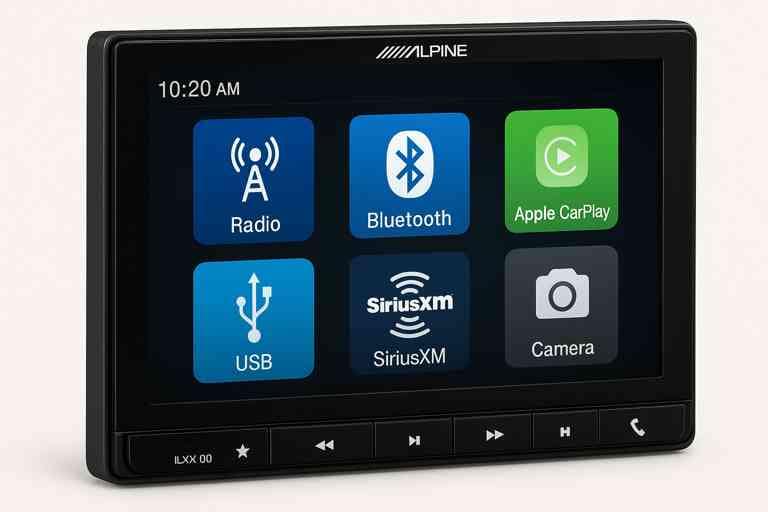
Connecting a camera to your Alpine ILX-F309 can significantly enhance your driving experience, offering improved safety and convenience. Whether you’re installing a rearview backup camera for easier parking or a front camera for added visibility, understanding the correct setup process is essential. This guide will walk you through how to connect a camera to Alpine ILX-F309, explain compatibility considerations, and provide troubleshooting tips to ensure a smooth installation.
Modern multimedia receivers like the Alpine ILX-F309 support a variety of camera types and configurations, but many users face challenges when connecting aftermarket cameras or optimizing settings. By the end of this guide, you’ll not only know how to connect your camera properly but also how to maintain it for reliable performance.
In this article, we’ll cover:
- Camera compatibility with Alpine ILX-F309
- Step-by-step connection instructions
- Troubleshooting common issues
- Tips for optimal performance
This ensures that both beginners and tech-savvy users can follow along and get their camera working seamlessly with the Alpine ILX-F309.
Understanding the Alpine ILX-F309 Camera Compatibility
Before diving into installation, it’s crucial to understand which cameras are compatible with the Alpine ILX-F309 and the differences between wired and wireless options. Choosing the right camera ensures a smooth connection, high-quality video, and reliable performance.
Which Cameras Work with the Alpine ILX-F309?
The Alpine ILX-F309 supports both rearview and front-facing cameras, but there are some specifics you should know:
- OEM Cameras: If you have a vehicle that already comes with a factory-installed camera, many OEM cameras can integrate directly with the Alpine ILX-F309 using compatible adapters.
- Aftermarket Cameras: These are widely available and often offer better features, such as night vision, wide-angle lenses, and higher resolution. Ensure the camera supports NTSC video format, as this is standard for the ILX-F309.
Key Compatibility Notes:
| Feature | Supported / Recommended |
| Video Input | NTSC format RCA cable |
| Resolution | 480p – 1080p (high-quality signals recommended) |
| Power Source | 12V (connected to reverse light for rear cameras) |
| Camera Type | Rearview, front-view, backup cameras |
| Wireless Option | Compatible, but may introduce slight delay or interference |
Pro Tip: While wireless cameras are convenient, wired connections generally provide a more stable video feed and less interference, especially in areas with high radio frequency signals.
Rearview Camera vs Front Camera
- Rearview Cameras: The most common setup for Alpine ILX-F309 users. They automatically activate when the vehicle is in reverse, making parking and backing up safer.
- Front Cameras: Useful for tight parking spots or off-road driving. They often require manual activation on the ILX-F309 interface.
Wired vs Wireless Cameras
Wired Cameras:
- Pros: Reliable signal, no interference, consistent video quality.
- Cons: Installation can be more labor-intensive, requiring cable routing through the vehicle.
Wireless Cameras:
- Pros: Easier installation, less invasive wiring.
- Cons: Possible signal lag, interference from other wireless devices, and occasional loss of video in certain environments.
Why Compatibility Matters
Using an incompatible camera can lead to:
- No video display on the ILX-F309
- Poor image quality or distorted video
- Frequent disconnections or flickering
Choosing the right camera from the start reduces troubleshooting and ensures the system works seamlessly.
Tools and Materials Needed to Connect a Camera to Alpine ILX-F309
Before starting the installation, it’s essential to gather all the necessary tools and materials. Having everything ready ensures a smooth process and minimizes mistakes that could damage your camera or head unit.
Essential Tools and Materials
- Camera
- Rearview, front-view, or backup camera compatible with Alpine ILX-F309.
- Ensure it supports NTSC format and 12V power supply.
- Rearview, front-view, or backup camera compatible with Alpine ILX-F309.
- RCA Video Cable
- Standard male-to-male RCA cable for connecting the camera to the ILX-F309 video input.
- Length depends on vehicle size; longer cables may require cable management.
- Standard male-to-male RCA cable for connecting the camera to the ILX-F309 video input.
- Power Wires
- Typically red for positive and black for ground.
- Connect the positive wire to the vehicle’s reverse light circuit for rear cameras or ignition power for front cameras.
- Typically red for positive and black for ground.
- Fuse Tap or Inline Fuse
- Protects the camera and vehicle electronics from voltage spikes.
- Recommended fuse rating: 3–5 amps depending on the camera specifications.
- Protects the camera and vehicle electronics from voltage spikes.
- Wire Connectors and Crimping Tools
- For secure and reliable wire connections.
- Includes butt connectors, spade connectors, or soldering tools.
- For secure and reliable wire connections.
- Mounting Hardware
- Brackets, screws, or adhesive pads included with the camera.
- Ensure the camera is stable and angled correctly.
- Brackets, screws, or adhesive pads included with the camera.
- Electrical Tape and Cable Ties
- For securing wires and preventing rattling.
- Helps maintain a clean, professional installation.
- For securing wires and preventing rattling.
- Multimeter (Optional)
- Useful for testing voltage and continuity before connecting wires.
- Useful for testing voltage and continuity before connecting wires.
Optional Accessories
- Extension RCA Cables
- For larger vehicles where the standard cable isn’t long enough.
- For larger vehicles where the standard cable isn’t long enough.
- Wire Loom or Split Tubing
- Protects cables from sharp edges and heat inside the car.
- Protects cables from sharp edges and heat inside the car.
- Waterproof Connectors
- Especially important for rear bumper-mounted cameras exposed to rain and dirt.
- Especially important for rear bumper-mounted cameras exposed to rain and dirt.
Pro Tip for a Smooth Installation
- Before connecting anything, lay out all wires and accessories and test the camera separately with a power source. This ensures the camera works before committing to full installation.
- Label wires to avoid confusion during connection. For example, mark the power wire, ground wire, and video RCA cable clearly.
Having the right tools and materials ready is the foundation for a successful camera installation. It prevents damage, reduces installation time, and ensures the Alpine ILX-F309 camera connection works flawlessly.
Step-by-Step Guide to Connect Camera to Alpine ILX-F309
Installing a camera on your Alpine ILX-F309 doesn’t have to be complicated if you follow a structured approach. This section provides a detailed, step-by-step guide to ensure a seamless connection, whether you’re installing a rearview or front camera.
Step 1 – Power Off the Head Unit
Before handling any wires or connections, it’s critical to turn off the Alpine ILX-F309 and disconnect the vehicle battery.
Why:
- Prevents electrical shorts or damage to the head unit.
- Ensures safety while working with power and signal wires.
Tip: Always wear insulated gloves if you’re handling wires directly.
Step 2 – Locate the Camera Input Port on Alpine ILX-F309
The ILX-F309 has a dedicated camera input port located at the back of the head unit.
- Look for the yellow RCA video input labeled “CAM” or “Rear Camera Input.”
- Some aftermarket adapters may require connecting to a separate camera interface module.
Tip: Keep a flashlight handy; access can be tricky depending on your vehicle dashboard layout.
Step 3 – Connect the Camera Video Cable
- Take the RCA video cable from your camera.
- Plug the male RCA connector into the camera video input on the ILX-F309.
- Ensure the connection is secure and snug to prevent signal loss.
Pro Tip: For long cable runs, avoid running the RCA cable alongside high-power wires to prevent interference.
Step 4 – Connect Power Wires
- Rear Camera: Connect the red power wire to the vehicle’s reverse light positive wire. This ensures the camera activates automatically when the car is in reverse.
- Front Camera: Connect to an ignition or ACC power source so it powers on when the car starts.
- Connect the black ground wire to a metal chassis point for proper grounding.
Tip: Use a multimeter to verify the correct voltage before connecting wires to avoid damaging your camera.
Step 5 – Mount the Camera Properly
The correct placement is critical for both visibility and functionality:
- Rearview Camera: Mount above or near the license plate, angled slightly downward to cover the area behind the vehicle.
- Front Camera: Mount at a high point on the grille or bumper for a clear forward view.
- Ensure the camera is secure to prevent shaking while driving.
Visual Tip: Use adhesive pads or brackets provided with your camera. Adjust the angle before final tightening.
Step 6 – Test the Camera Connection
- Reconnect the vehicle battery and turn on the ILX-F309.
- Put the car in reverse (for rear cameras) or switch on the ACC (for front cameras).
- Verify that the camera feed appears on the screen.
Troubleshooting Tips:
- If no image appears, check power wires, RCA connections, and that the ILX-F309 input is set to the correct source.
- Inspect the cable for kinks or loose connections.
Step 7 – Adjust Camera Angle and Settings
Once the camera is displaying correctly:
- Adjust the angle for optimal field of view.
- If your camera supports settings like brightness, contrast, or guide lines, configure them via the ILX-F309 interface.
- Test during both day and night to ensure visibility in all lighting conditions.
Tip: Most Alpine users find a slightly downward tilt for rear cameras provides the best view for parking without distortion.
Summary Table: Step-by-Step Installation
| Step | Action | Tips |
| 1 | Power off head unit | Disconnect battery for safety |
| 2 | Locate camera input | Yellow RCA “CAM” port at back |
| 3 | Connect RCA video cable | Avoid running alongside high-power wires |
| 4 | Connect power wires | Red to reverse/ACC, black to ground |
| 5 | Mount camera | Ensure secure placement and proper angle |
| 6 | Test camera | Verify video feed on screen |
| 7 | Adjust settings | Optimize angle, brightness, and guides |
Following these steps ensures a reliable and functional camera connection to your Alpine ILX-F309.
Troubleshooting Camera Connection Issues on Alpine ILX-F309
Even with proper installation, some users may experience issues with their camera connection to the Alpine ILX-F309. This section covers common problems and practical solutions to ensure your camera works reliably.
Camera Not Displaying on Screen
If your camera feed does not appear on the ILX-F309 screen:
- Check Power Connections: Ensure the camera’s positive wire is connected to the reverse light (rear camera) or ACC power (front camera) and the ground wire is properly attached.
- Verify RCA Connection: Make sure the RCA video cable is plugged firmly into the yellow “CAM” input port.
- Input Source: On the ILX-F309, navigate to the camera input settings and ensure the correct source is selected.
- Test the Camera: Connect the camera to an external monitor to confirm it is working.
Poor Video Quality
If the image appears blurry, distorted, or has poor color:
- Check Cable Quality: Low-quality RCA cables or long runs can degrade video signals. Use shielded cables for better performance.
- Lighting Conditions: Ensure your camera supports night vision if you drive in low-light conditions.
- Camera Lens Cleanliness: Dirt, dust, or water droplets on the lens can drastically reduce clarity. Regular cleaning is recommended.
- Resolution Compatibility: The ILX-F309 supports 480p to 1080p signals. Using a camera with higher resolution may not improve display quality and can cause distortion.
Camera Flickering or Cutting Out
Intermittent video or flickering is usually caused by electrical interference or loose connections:
- Secure Connections: Check that all RCA and power connections are tight and free of corrosion.
- Avoid Interference: Keep RCA cables away from high-current wires such as battery, alternator, or ignition lines.
- Voltage Check: Use a multimeter to ensure the camera receives consistent 12V power when the vehicle is in reverse or ignition on.
- Wireless Cameras: If using a wireless camera, ensure there are no strong RF sources nearby that could disrupt the signal.
Additional Troubleshooting Tips
- Reset ILX-F309: If the camera still doesn’t display correctly, try a factory reset of the head unit.
- Firmware Update: Alpine occasionally releases firmware updates to improve camera compatibility and system stability.
- Professional Assistance: For persistent issues, a professional car audio installer can test connections and ensure proper grounding and signal quality.
Pro Tip: Keeping a troubleshooting checklist handy can save time. Always verify power, video signal, and input settings first before assuming the camera is defective.
Tips for Optimal Camera Performance with Alpine ILX-F309
Once your camera is installed and connected to the Alpine ILX-F309, maintaining performance and ensuring a clear, reliable video feed is essential. Here are expert tips to get the most out of your camera setup.
1. Regularly Clean the Camera Lens
- Dirt, dust, water spots, and grime can accumulate on the lens, especially on rear cameras exposed to road conditions.
- Use a microfiber cloth to gently wipe the lens weekly. Avoid abrasive materials that can scratch the surface.
- For outdoor cameras, consider using water-repellent coatings to reduce fogging and rain interference.
2. Use High-Quality RCA and Power Cables
- Shielded RCA cables minimize interference from other vehicle electronics.
- Avoid low-quality or excessively long cables that can degrade video signals and cause flickering.
- For power wires, ensure proper gauge and insulation to prevent voltage drops.
3. Secure and Protect Wiring
- Route all wires through wire looms or split tubing to protect against sharp edges, heat, and vibration.
- Use cable ties to secure loose wires and prevent rattling.
- Properly grounded wires reduce interference and ensure stable video display.
4. Optimize Camera Angle
- Rearview Cameras: Slightly tilt downward to capture the area immediately behind the vehicle without distorting distance perception.
- Front Cameras: Mount at a height that avoids capturing the car hood excessively but still covers the forward path.
- Test during different lighting conditions to ensure the view is accurate in both day and night scenarios.
5. Update Alpine ILX-F309 Firmware
- Alpine occasionally releases firmware updates that improve camera compatibility and system stability.
- Visit Alpine’s official website to download the latest firmware for your ILX-F309.
- Regular updates ensure your camera connection works reliably with new camera models.
6. Avoid Wireless Interference
- If using a wireless camera, ensure it is operating on a clear frequency without interference from Wi-Fi, mobile hotspots, or other wireless devices.
- Place the receiver unit away from other high-power electronics to maintain signal integrity.
7. Test Camera Before Long Trips
- Before going on long drives, test the camera system to ensure it activates correctly in reverse or ignition-on mode.
- Adjust settings such as brightness, contrast, and guide lines on the ILX-F309 to suit your visibility preferences.
Pro Tip: Combining good installation practices with regular maintenance ensures the camera system performs optimally and lasts for years, providing a safer driving experience.
Frequently Asked Questions (FAQs) About Connecting a Camera to Alpine ILX-F309
Many users have similar questions when it comes to installing a camera on their Alpine ILX-F309. This section addresses the most common concerns and provides clear, actionable answers.
1. Can I connect a wireless camera to the Alpine ILX-F309?
Yes, the Alpine ILX-F309 can work with wireless cameras. However:
- Pros: Easier installation with no long RCA cables.
- Cons: Potential for signal lag, interference, or occasional video dropouts.
- Tip: For the most stable feed, a wired connection is recommended, especially for rearview cameras.
2. Do I need professional installation for the camera?
Not necessarily. Many users can connect a camera themselves with:
- Basic tools (RCA cables, power wires, mounting hardware)
- Following a step-by-step guide like this one.
However, professional installation is recommended if:
- You’re uncomfortable with vehicle wiring.
- Your vehicle requires custom adapters or modifications.
- You want a clean, hidden wiring setup for aesthetics.
3. Can I use a front camera with Alpine ILX-F309?
Yes, the ILX-F309 supports front-facing cameras. Key points:
- Front cameras usually require manual activation on the head unit.
- Connect to ACC or ignition power so it turns on with the vehicle.
- Ensure proper placement to avoid capturing too much of the hood.
4. What is the best rear camera for Alpine ILX-F309?
Some recommended options:
- Alpine HCE-C1100 – OEM-compatible, high-resolution.
- eRapta ERT01 – Budget-friendly, waterproof, wide-angle lens.
- LeeKooLuu Backup Camera – Wireless option with good night vision.
Tip: Choose a camera that supports NTSC format and is rated for automotive use.
5. Will aftermarket cameras work with Alpine ILX-F309?
Yes, most aftermarket cameras work if:
- They support the NTSC video format.
- Power requirements match vehicle output (12V).
- Wired or wireless connection is compatible with the ILX-F309 input.
Pro Tip: Check the camera’s field of view, resolution, and low-light performance to ensure it meets your needs.
6. How do I know if the camera is compatible with Alpine ILX-F309?
- Verify video format (NTSC) and power requirement (12V).
- Check if the camera supports RCA video output (yellow RCA cable).
- Confirm the camera’s mounting type fits your vehicle and desired view.
Additional Resources for Connecting a Camera to Alpine ILX-F309
For readers who want to explore further or need extra help, these resources provide valuable information, compatible products, and professional guidance for connecting a camera to the Alpine ILX-F309.
1. Alpine ILX-F309 User Manual and Installation Guide
- Official manuals provide detailed instructions on camera input locations, wiring diagrams, and head unit settings.
- Link: Alpine ILX-F309 Owner’s Manual
Tip: Always refer to the manual before starting installation to avoid warranty issues or damage.
2. Recommended Cameras for Alpine ILX-F309
- Alpine HCE-C1100 – OEM-style, high-resolution rearview camera.
- eRapta ERT01 – Affordable waterproof rear camera with wide-angle lens.
- LeeKooLuu Wireless Backup Camera – Easy wireless setup with night vision.
Tip: Ensure any aftermarket camera supports NTSC video format for proper compatibility.
3. Professional Installation Services
If you’re not comfortable with DIY installation:
- Many car audio shops offer professional installation for Alpine head units and cameras.
- Search for certified installers in your area to ensure a clean, secure, and reliable setup.
4. Online Tutorials and Video Guides
- Video tutorials can visually demonstrate step-by-step installation and wiring tips.
- Popular platforms like YouTube have numerous Alpine ILX-F309 camera installation videos.
Tip: Look for tutorials that match your vehicle make and model to get accurate guidance.
5. Support Forums and Communities
- Join forums such as Alpine Owner’s Club or automotive Reddit communities for tips, troubleshooting advice, and shared experiences.
- Engaging with other users can provide solutions to uncommon issues or advanced customization options.
Pro Tip: Combining official manuals, professional guidance, and community advice ensures a smooth camera installation and maximizes the performance of your Alpine ILX-F309 camera setup.
Conclusion: Connecting a Camera to Alpine ILX-F309 Made Easy
Connecting a camera to your Alpine ILX-F309 doesn’t have to be complicated. By understanding camera compatibility, gathering the right tools and materials, and following a step-by-step installation process, you can enjoy a reliable, high-quality camera feed that enhances your driving safety and convenience.
Key takeaways from this guide:
- Choose the right camera: Ensure it supports NTSC format, proper power requirements, and fits your mounting preferences.
- Follow step-by-step instructions: Power off the head unit, connect RCA video and power cables, mount the camera, and test the system before finalizing.
- Troubleshoot effectively: Address common issues like no display, poor video quality, or flickering by checking connections, voltage, and settings.
- Optimize performance: Clean the lens, secure wiring, update firmware, and adjust angles for the best view.
- Use available resources: Manuals, recommended cameras, professional installation services, and online communities can provide additional guidance.
By following this comprehensive guide, you can confidently connect your camera to the Alpine ILX-F309, ensuring a smooth, professional-quality installation. Whether you’re using a rearview or front camera, wired or wireless, these steps and tips will help you maintain optimal performance for years to come.
Final Tip: Regular maintenance, careful installation, and using high-quality components are the keys to a long-lasting, reliable camera setup with your Alpine ILX-F309.